How to Land Workplace Giving Emails in Supporters’ Inboxes
Bottom line up front: Mastering workplace giving email delivery, and ensuring your messaging lands directly in supporters’ inboxes, requires four coordinated habits: authenticating your sending domain with SPF, DKIM, and DMARC records, maintaining clean employer-segmented donor lists, writing conversational plain-text-style copy without spam triggers, and automating post-donation outreach after a supporter gives.
Workplace giving email fun facts:
- According to Double the Donation’s research, 66.7% of nonprofit professionals rely on email as their primary channel for promoting matching gifts.
- Roughly 40% of nonprofits report that automated email reminders with direct company links and impact updates drive matching gifts and volunteer grants through to fulfillment.
- 33% of nonprofits do not send email reminders to prompt donors to submit their matching gift requests, leaving substantial corporate revenue unclaimed.
- Real-world results prove what is possible when messages reach the primary inbox: Maine Public achieved a 69% open rate on its automated follow-up matching gift email, while Wayne State University reached a 54% open rate on its matching gift email stream.
These benchmarks highlight both the revenue potential of email outreach and the immediate cost of poor inbox placement. When corporate philanthropy messages land in spam or disappear inside crowded promotional tabs, donors never learn that their employers will double their gifts or reward their volunteer hours.
That’s why, in this guide, we’ll cover:
- Technical email authentication
- Clean donor and employer data
- Strategic email copy and formatting
- Smart send timing and behavioral triggers
- Common deliverability mistakes
- The benefits of automated software
Understanding how to land your workplace giving emails in supporters’ inboxes is one of the highest-leverage technical and strategic steps within any workplace giving marketing blueprint. At Double the Donation, we’ve seen firsthand what separates high-converting outreach from messages that go unseen. And it’s worth noting that even the most compelling matching gift appeal cannot generate revenue if mailbox providers block it at the door or bury it where supporters rarely look.
Let’s begin!
Technical email authentication protects your nonprofit sender reputation.
When a supporter completes a donation form and triggers an automated workplace giving email, receiving mail servers immediately inspect the technical credentials behind that message. If your organization sends automated corporate giving outreach through a third-party fundraising platform without proper authentication, inbox filters treat the message as suspicious because the visible “From” address does not match the server sending the mail.
To establish full technical trust with receiving servers, your IT or web administration team should configure three foundational protocols:
- Sender Policy Framework (SPF): Publishes an explicit list of authorized mail servers and third-party fundraising platforms permitted to send emails on behalf of your nonprofit’s domain.
- DomainKeys Identified Mail (DKIM): Attaches an encrypted cryptographic signature to every outgoing email header, verifying that the message was not altered in transit.
- Domain-based Message Authentication, Reporting, and Conformance (DMARC): Instructs receiving servers on how to handle messages that fail SPF or DKIM checks while sending diagnostic reports back to your team.
- Dedicated sending subdomains: Isolates automated fundraising outreach (for example, using giving.yournonprofit.org rather than your main staff domain) so transactional campaigns never jeopardize everyday executive correspondence.
Reviewing official Google Workspace sender guidelines alongside your email service provider’s DNS documentation ensures your records meet current bulk-sender enforcement standards. While setting up DNS records requires roughly one to two hours of upfront coordination between your development staff and IT administrator, that one-time investment safeguards your sender reputation across every year-end campaign and Giving Tuesday surge.
Learn how to manage your technical setup in Double the Donation here.
Clean donor and employer data prevents high bounce rates and spam flags.
Inbox providers continuously score senders based on how recipients interact with their mail. When a nonprofit blasts a generic workplace giving announcement to an outdated list full of deactivated addresses, hard bounces spike and open rates plummet, signaling to mailbox algorithms that your organization sends unsolicited bulk mail.
Therefore, data hygiene and smart segmentation protect deliverability while sharpening campaign relevance:
- Verify addresses at capture: Use real-time form validation on donation pages and volunteer sign-ups to catch typos before bad addresses enter your CRM.
- Segment by known employer eligibility: Prioritize sending company-specific match instructions to donors whose employers offer active programs, rather than emailing your entire database indiscriminately.
- Enrich missing employment records: Fill gaps in donor profiles by running periodic employer appends so your outreach reflects accurate workplace eligibility.
- Suppress inactive contacts: Automatically remove hard bounces, unsubscribes, and chronically unengaged addresses from automated workplace giving streams.
Maintaining clean data requires ongoing discipline, especially when supporters change jobs or retire. By pairing regular database hygiene with targeted donor profile enrichment, your development team sends fewer wasted emails and earns higher engagement signals from every message delivered.
Strategic email copy and formatting help messages bypass promotional filters.
Even when your technical authentication and list hygiene are spotless, the words and code inside your email determine whether filters classify your message as a personal follow-up or a mass marketing blast. Supporters are far more likely to open and act on an email that reads like a helpful, one-to-one stewardship message rather than a glossy advertisement.
Conversational subject lines outperform promotional buzzwords
Spam filters scan subject lines for exaggerated claims, excessive capitalization, and punctuation gimmicks. Phrases such as “CLAIM YOUR FREE MONEY NOW!!!” or “URGENT: 2X CASH MATCH!!!” immediately raise red flags with automated content filters and feel impersonal to donors.
Instead, craft clear, specific subject lines that reference the donor’s recent action and employer name, such as “Thank you for your gift, Sarah (and a note on Apple’s matching program)” or “Double your recent gift to [Nonprofit] through Microsoft.”
Specific, low-pressure phrasing signals authenticity to both spam filters and busy supporters scanning their primary inbox.
Simple single-column layouts keep automated outreach in the primary tab
Emails packed with oversized banner images, multiple tracking links, and complex HTML tables closely resemble retail promotions. Stripping away heavy design elements in favor of a clean single-column layout with plain-text styling and one clear button to the donor’s corporate portal helps messages land in the primary tab.
This personal approach also encourages two-way donor engagement. As Kara King of World Animal Protection US shared during a recent virtual strategy session,
“If somebody does respond to those emails, it comes directly to me, and I can answer pretty quickly. So I’m able to answer questions… in a pretty quick amount of time. So it makes our donors feel heard, and it gives them what they need quickly without overloading our already pretty full schedules.”
When an email looks and reads like a genuine note from a real person on your team, supporters feel comfortable hitting reply when they need help navigating their company portal.
Smart send timing and behavioral triggers maximize supporter open rates.
Timing plays a major role in both inbox placement and supporter action. When a supporter completes an online gift, they immediately expect a payment receipt and thank-you message. If a second automated message from the same organization hits their inbox at the exact same timestamp, mail servers may throttle the duplicate send, and busy donors frequently overlook it while archiving their receipt.
Real-world nonprofit testing confirms how a simple timing adjustment transforms inbox performance:
- One-hour post-donation trigger: Courtney Davidson of Breakthrough T1D explained how refining their send delay changed their results: “Initially, we launched the automated communication to go out at zero hours. We did adjust to an hour later and are seeing a lot better response to that.” Following that adjustment and adding a donation form lookup tool, the organization saw a five-fold increase in match-eligible donors identified.
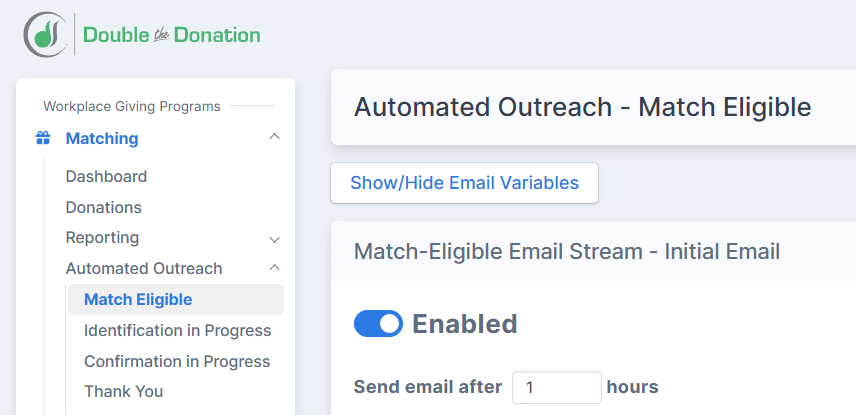
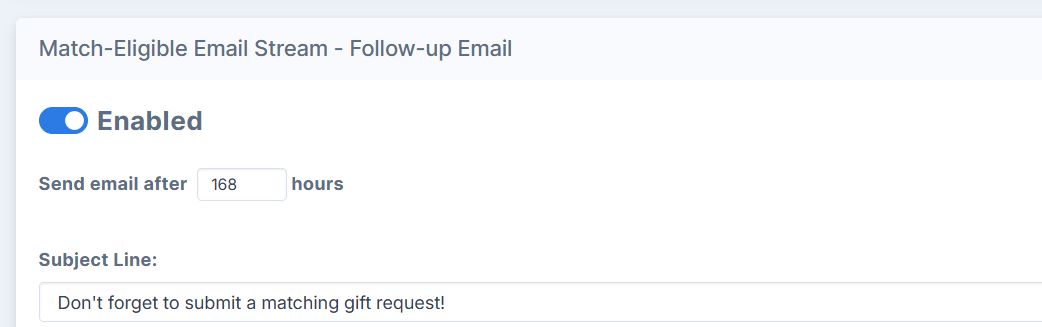
- Seven-day secondary check-in: For supporters who open the initial message or click through to check eligibility without completing their corporate submission, a polite follow-up one week later provides a timely reminder while the donation is still fresh.
- Pre-deadline urgency nudges: Sending targeted reminders ahead of corporate submission cutoffs (such as December 31) gives eligible employees a clear reason to act before their company match expires.
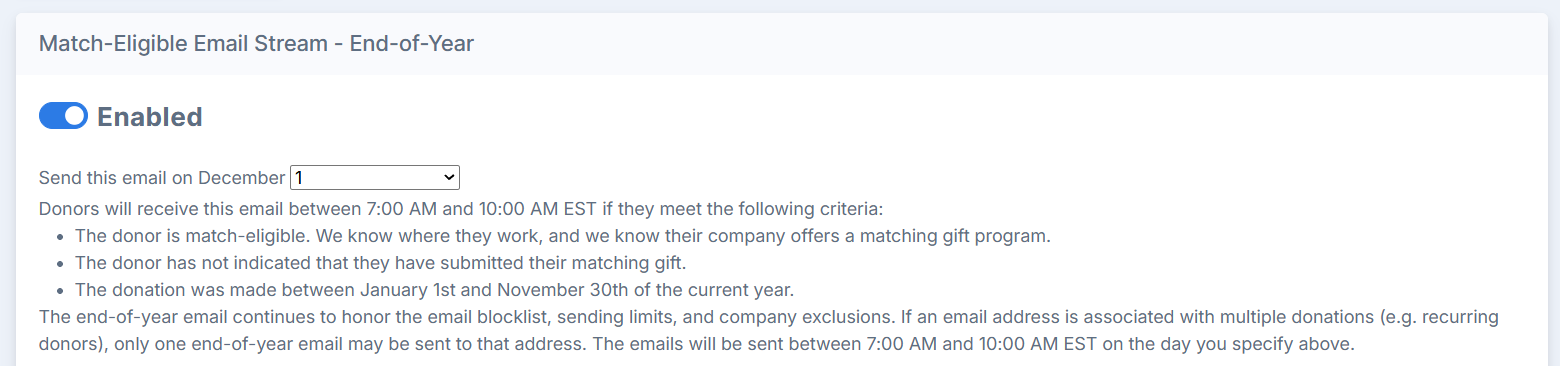
Spacing out behavioral touchpoints keeps your sending volume steady rather than creating sudden bulk spikes that alarm inbox providers. When every follow-up responds directly to a supporter’s real-time engagement, your messages earn consistently higher open and click-through rates.
Common deliverability mistakes quietly sabotage workplace giving outreach.
Many common deliverability issues stem from treating workplace giving emails like standard mass marketing newsletters rather than personalized stewardship communications. Avoiding a few predictable missteps protects both your domain score and the donor experience.
- Relying solely on corporate email addresses: Many companies deploy strict enterprise security gateways that quarantine automated external emails containing links to third-party portals. Collecting a supporter’s personal email address alongside their employer name ensures your instructions reach their primary inbox even if their work server filters external mail.
- Failing to suppress completed submissions: Continuing to send automated reminder emails after a supporter has already submitted their matching gift or volunteer grant request creates inbox fatigue and increases unsubscribe or spam-report rates. (Hint: our new Matching Gift Administration feature helps with this step!)
- Ignoring volunteer and retiree eligibility: Sending matching gift instructions to retired donors or volunteers without tailoring the message to retiree match rules or volunteer grant programs leads to confusion and lower engagement.
- Blasting unsegmented year-end appeals: Waiting until the final week of December to email your entire database about workplace giving generates sudden volume surges that trigger ISP throttling and bury your appeals below competing retail promotions.
Proactively auditing your email workflows for these edge cases prevents unnecessary unsubscribes and keeps your sender reputation healthy throughout the calendar year.
Automated software lands workplace giving emails in supporters’ inboxes.
Manually tracking employer rules, personalizing portal URLs, and suppressing completed requests across thousands of donors is nearly impossible for lean nonprofit teams. Modern workplace giving software builds technical and behavioral deliverability safeguards directly into your fundraising workflow:
- Authenticated custom sending domains: Double the Donation lets your organization send automated workplace giving emails from your own verified nonprofit domain or subdomain, preserving brand recognition and full SPF, DKIM, and DMARC alignment.
- Dynamic employer-specific content: Every email automatically populates with the supporter’s exact employer guidelines, minimum and maximum match amounts, and direct submission links, eliminating generic bulk copy.
- Multi-program email streams: Dedicated workflows tailor outreach across matching gifts, payroll giving, and corporate volunteer email streams, so supporters receive messages only relevant to how they engage with your mission.
- Automated status-based suppression: As soon as a donor clicks through and logs their matching gift submission, automated follow-up reminders stop immediately so supporters never receive redundant nudges.
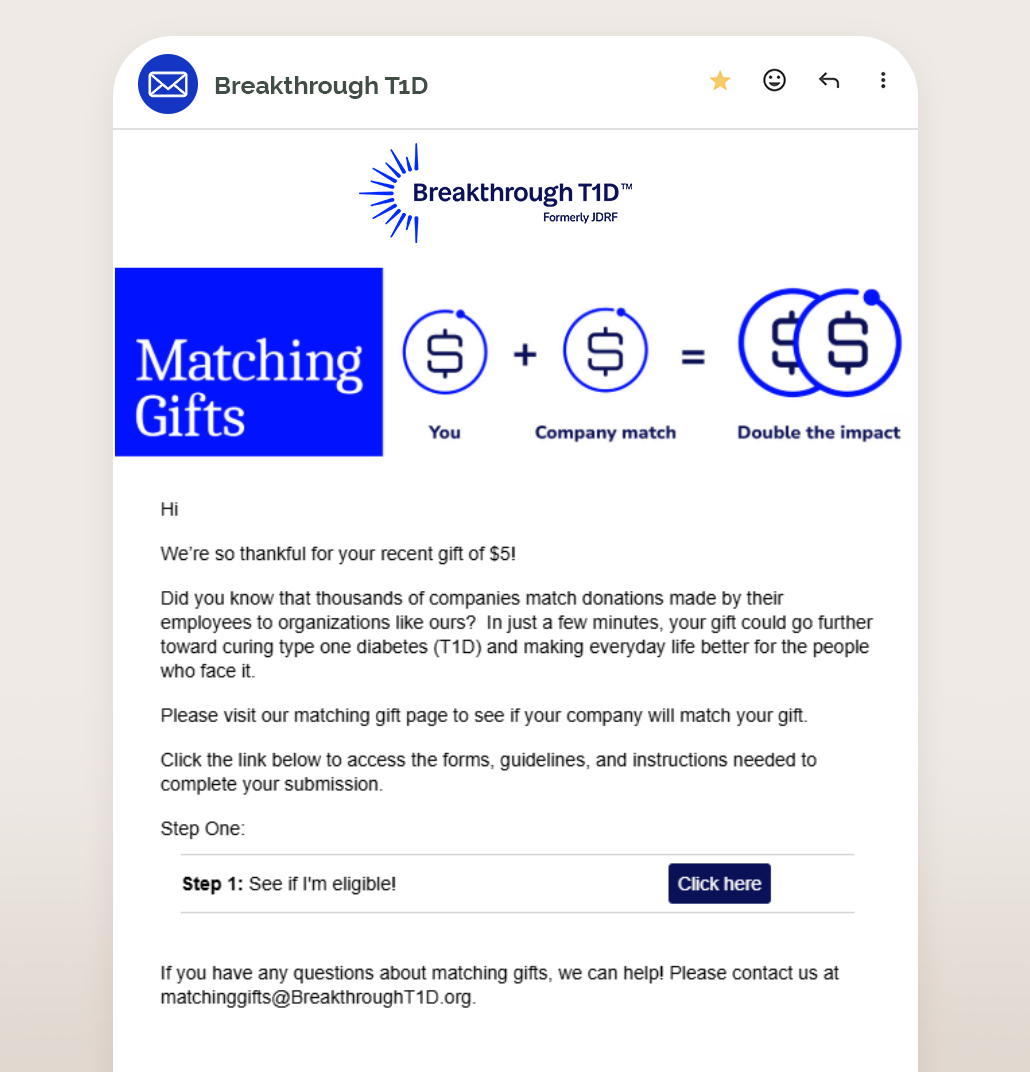
While automation handles daily execution, teams should still plan for an honest operational trade-off: dedicating a few hours during initial onboarding to configure DNS records, customize default brand templates, and review bounce metrics each quarter. That modest upfront and ongoing attention ensures your automated streams continue performing at peak deliverability year after year.
Wrapping up: next steps for workplace giving email engagement
Mastering how to land your workplace giving emails in supporters’ inboxes comes down to aligning technical trust with thoughtful donor stewardship. By authenticating your sending domain, maintaining clean employer-segmented records, writing conversational single-column messages, and spacing out automated post-donation triggers, your team can ensure valuable matching gift and volunteer grant opportunities never get lost in spam.
Ready to see how automated, brand-authenticated outreach can turn more of your supporters’ gifts and volunteer hours into corporate funding? Schedule a personalized Double the Donation demo today to explore how our platform streamlines donor identification, email customization, and corporate gift tracking for your team.
Continue building your workplace giving strategy with these resources:
- Workplace giving research: Explore the latest benchmarks, donor awareness statistics, and corporate philanthropy trends from Double the Donation’s ongoing industry studies.
- Templates to boost payroll giving participation: Copy and customize proven, plain-text-style email scripts designed to introduce recurring workplace payroll deductions to engaged supporters.
- Matching gift auto-submission: Learn how direct CSR platform integrations simplify matching gift requests for eligible donors right after they complete an online gift.
 About the Author: This blog post was written by Kanwei Li, Double the Donation’s Chief Technology Officer and Co-Founder, who helps nonprofits and educational institutions maximize corporate matching gifts, volunteer grants, payroll giving revenue, and more through data-driven automation.