Analyzing Impact Data With Our Top Workplace Giving Reports
Data is the secret weapon of high-performing development teams. When it comes to corporate fundraising, tracking supporter activity, identifying employer hubs, and monitoring outreach metrics can turn a passive strategy into a massive revenue engine. Luckily, Double the Donation provides intuitive workplace giving reporting tools that allow organizations to pull actionable insights across every facet of workplace giving in just a few clicks.
- The Unmatched Value of Workplace Giving Data Reporting
- How to Access the Workplace Giving Reports, Step by Step
- Double the Donation’s (10) Pre-Made Workplace Giving Reports
- Best Practices for Data-Informed Workplace Giving Success
In this guide, we’ll walk through how to access your reports, explore our top ten pre-made workplace giving reports, and cover best practices to help your team turn raw metrics into concrete fundraising success.

The Unmatched Value of Workplace Giving Data Reporting
Over $4 to $7 billion in matching gift funds goes unclaimed every year. For most nonprofits, this gap exists because they lack visibility into donor employment data. Donors often don’t know their employers match charitable gifts or offer volunteer grants, and busy development staff lack the time to manually research thousands of records.
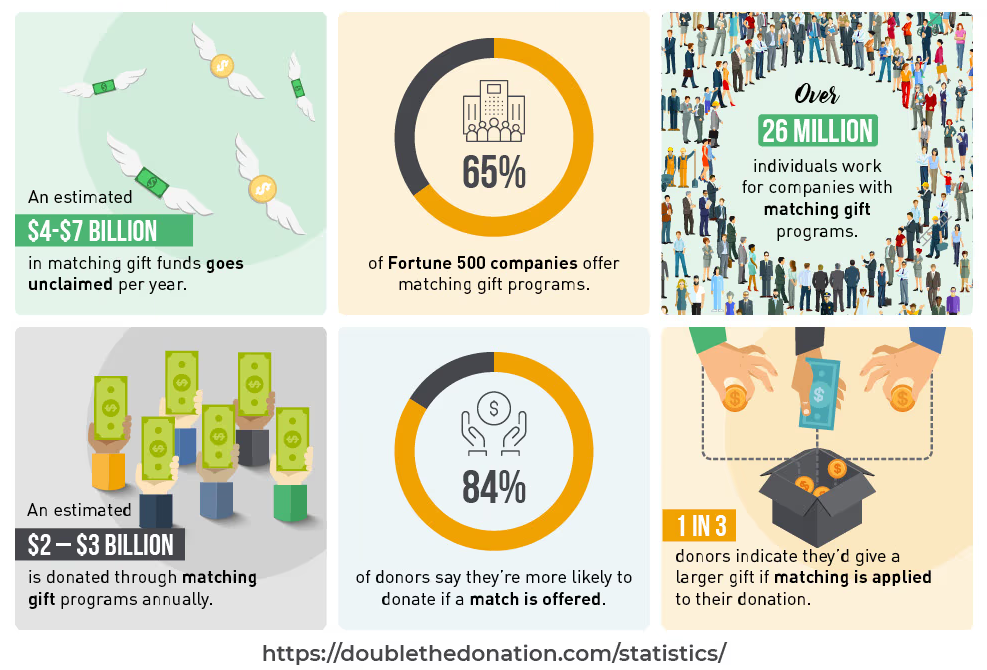
Dedicated workplace giving reporting solves this problem by eliminating guesswork. Instead of spending 10 to 15 hours each month manually digging through spreadsheets, automated data reporting gives your team a clear, real-time view of your corporate support pipeline. When done well, reporting helps you:
- Identify Uncaptured Revenue: Instantly locate donors who qualify for corporate matches or volunteer grants but have not yet submitted requests.
- Uncover Employer Hubs: Spot large concentrations of donors working for the same company, opening doors for corporate event sponsorships and deeper partnerships.
- Optimize Automated Outreach: Monitor open rates and conversion metrics to make sure your donor communications deliver maximum results.
- Save Staff Time: Focus your team’s energy on high-value stewardship while automation handles the tracking.
How to Access the Workplace Giving Reports, Step by Step
Double the Donation’s intuitive workplace giving reporting tools allow users to pull actionable insights across every facet of workplace giving in just a few clicks. Follow these steps to navigate your data:
Step 1: Log in to your Double the Donation account.
Head to the login page to get started. Upon signing in with your credentials, you’ll be taken to your home page dashboard. This view provides a bird’s-eye look at your most vital metrics, such as match-identified revenue, donor engagement levels, and total donor events.
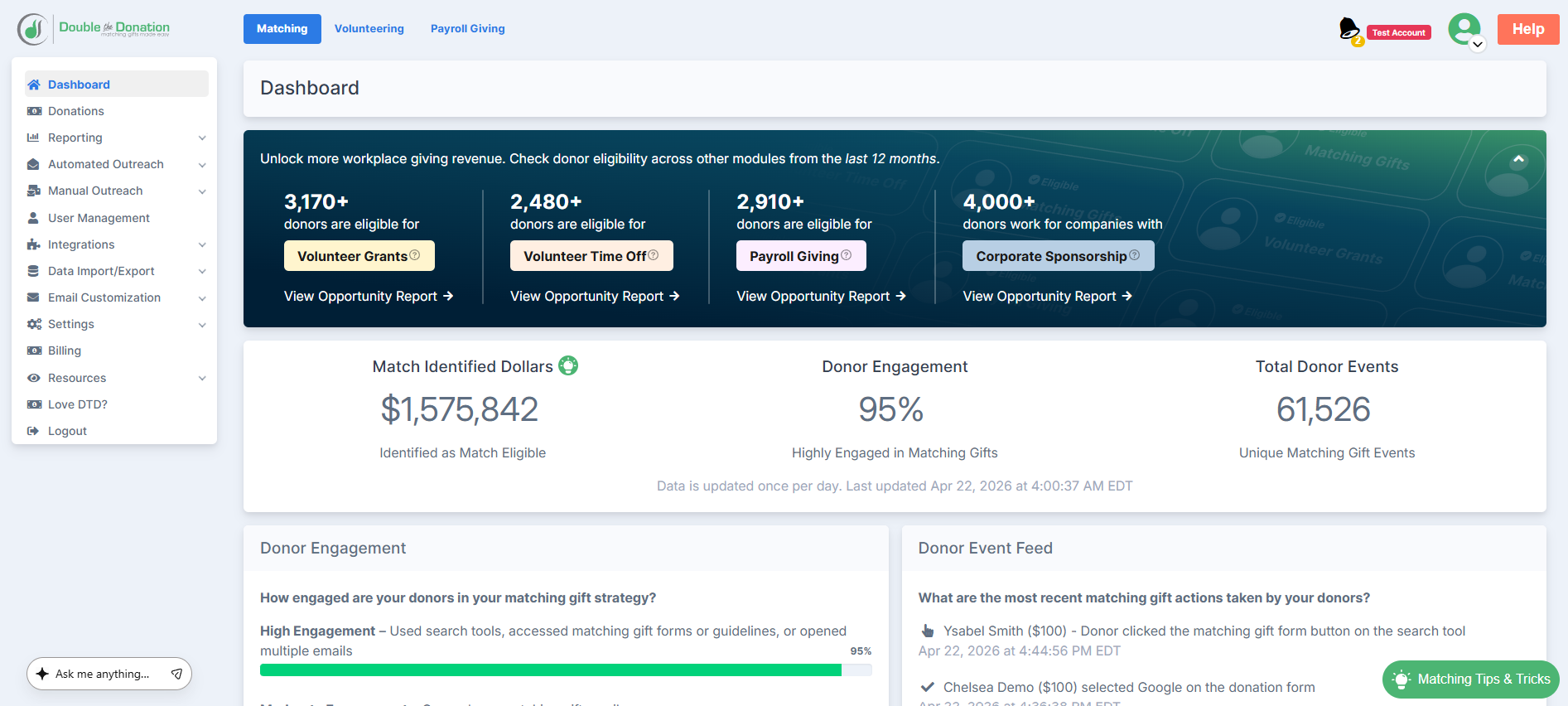
Keep an eye out for our cross-module banner, too! This feature highlights untapped potential within your database by providing a view of supporters who work for companies with workplace volunteer programs, payroll giving, and even corporate sponsorships.
Step 2: Select your module: Matching, Volunteer, or Payroll Giving.
Identify which area of workplace fundraising you’d first like to analyze. In the top-left corner of the platform, select the Double the Donation module that aligns with your current goals:
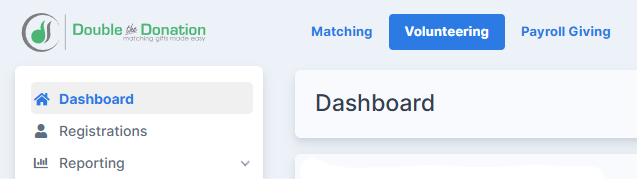
Step 3: Navigate to the “Reporting” dropdown menu.
Once you’ve entered the desired module, locate the “Reporting” tab in the vertical navigation menu on the left side of your screen. Clicking this option will trigger a dropdown menu featuring all reports available for that specific module.
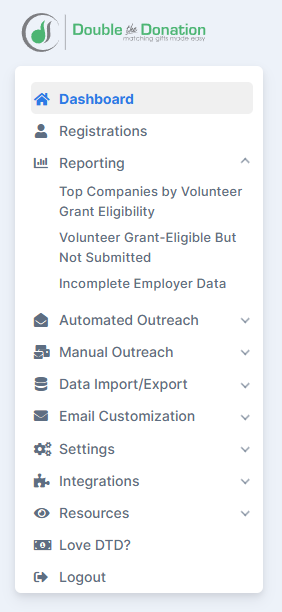
Step 4: Choose a report to browse.
From the populated list, select the specific report that you’d like to view. The platform will generate a detailed page reflecting your organization’s most recent data.
By default, our workplace giving reports display data from the past 90 days of account activity and are updated once daily. If you require a different look-back period, you can customize and export specific time frames to suit your needs.
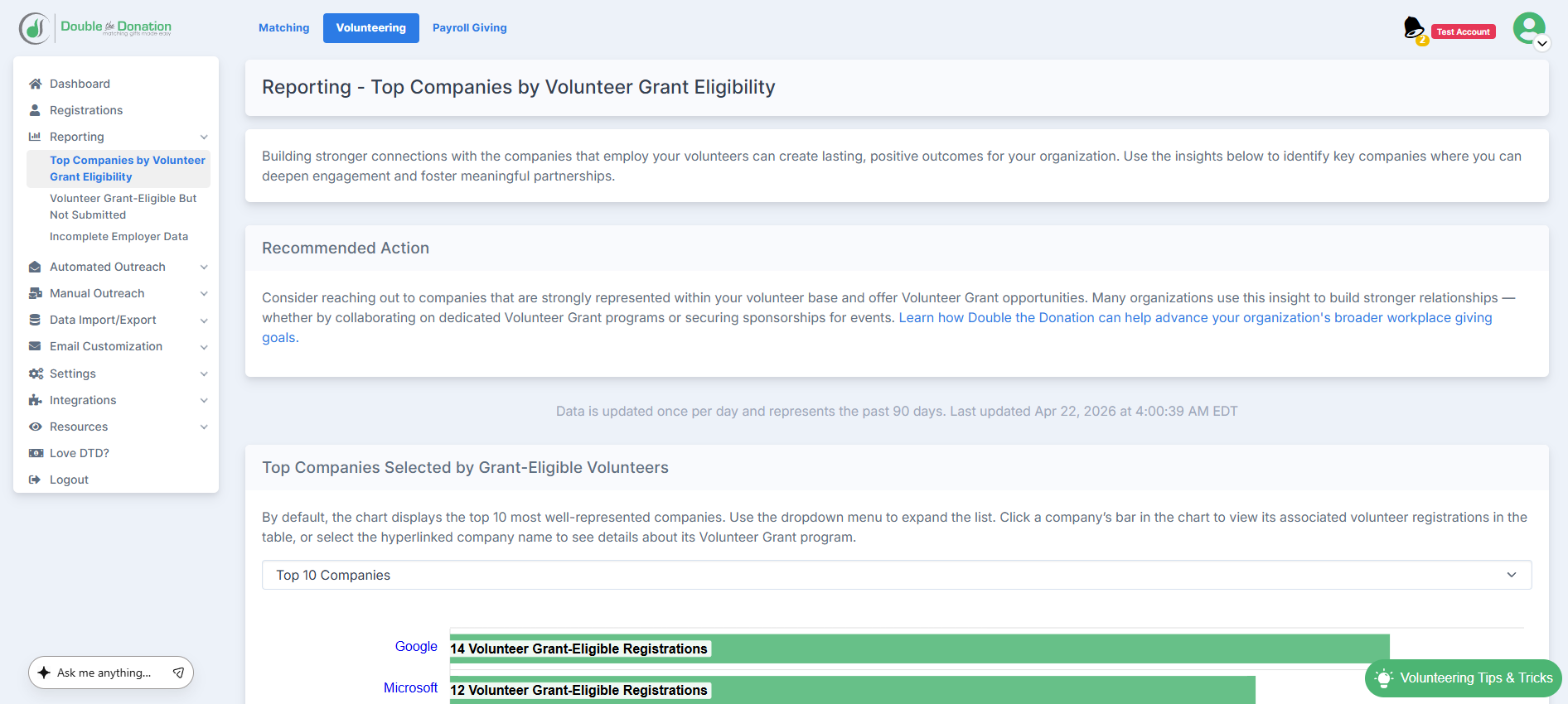
Pro Tip: Every report includes a concise description of the data analysis provided, along with a “recommended action” to help your team turn these actionable insights into a concrete strategy.
Double the Donation’s (10) Pre-Made Workplace Giving Reports
Check out our top ten pre-made reports designed to supercharge your corporate fundraising:
1) Leading Companies (identify corporate hubs)
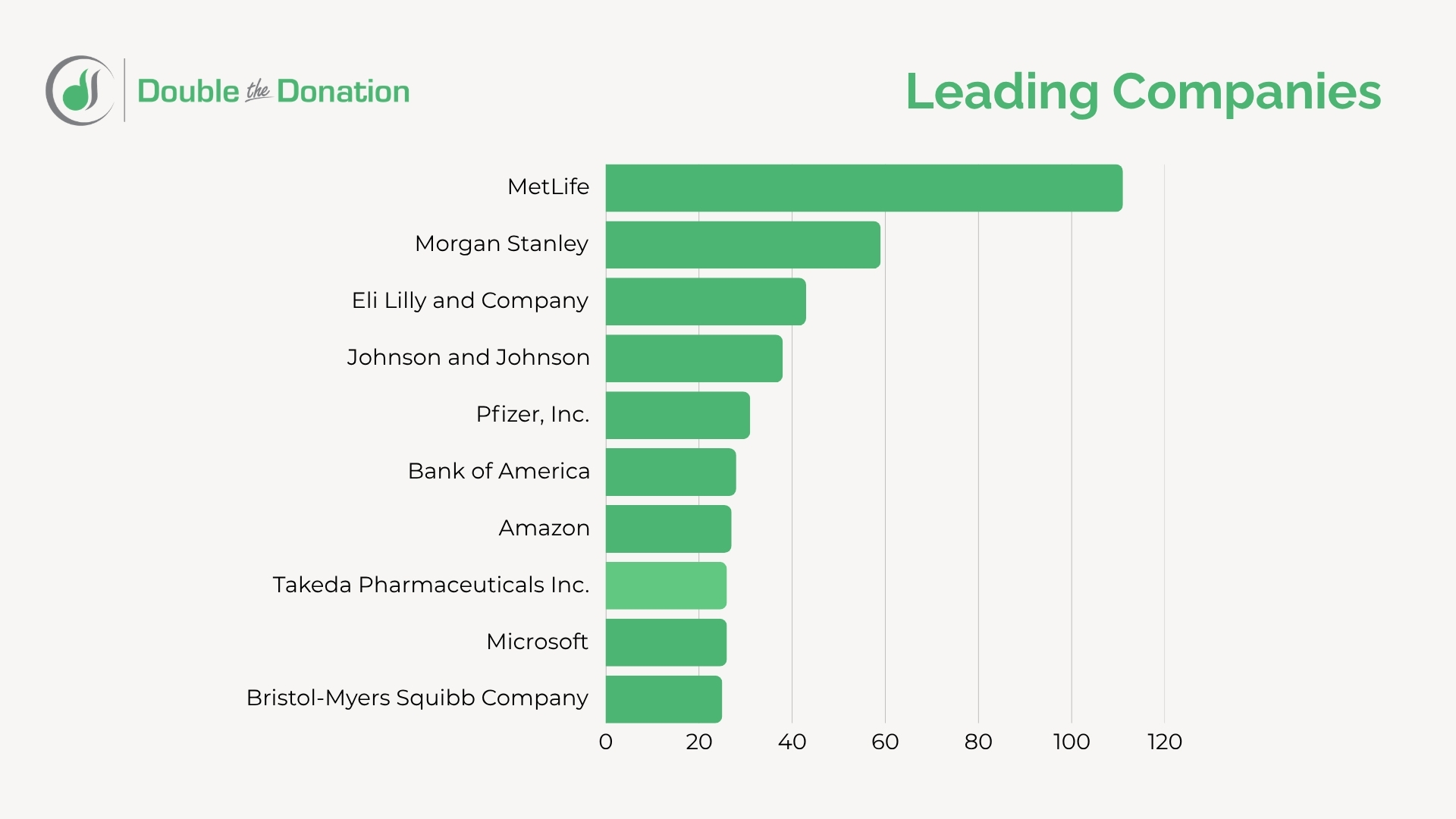
What it shows: A ranked list of top employer matches found within your donor or volunteer base.
Why it matters: This report highlights where your supporters work. Finding clusters of donors at companies like Google, Home Depot, or Microsoft lets you target those companies for deeper corporate engagement, employee giving drives, or event sponsorships.
2) Eligible But Not Submitted (capture unclaimed revenue)
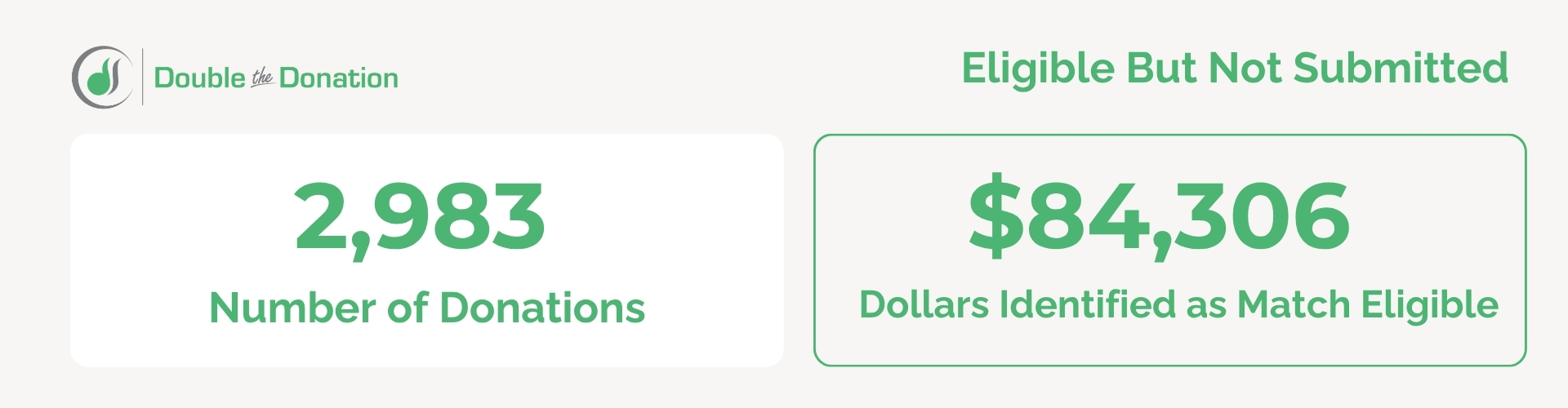
What it shows: Supporters who work for match-eligible employers but have not yet submitted their gift match requests.
Why it matters: This report points directly to unclaimed money. Using this list, your team can send quick follow-up reminders to guide donors through the final submission steps.
3) Potentially Miscategorized Ineligible (uncover hidden opportunities)
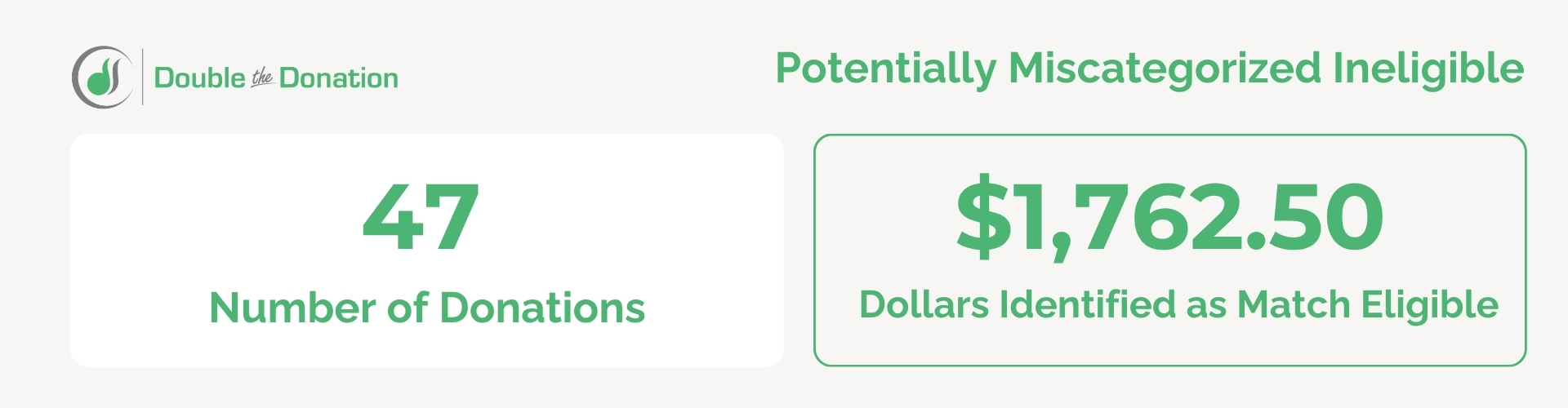
What it shows: Records flagged as “ineligible” due to strict automated filters or partial donor search queries.
Why it matters: Sometimes a donor types a parent company or a subsidiary name that gets flagged incorrectly. Auditing this report helps you catch hidden opportunities and update supporter records manually.
4) Missed Communication (close engagement gaps)
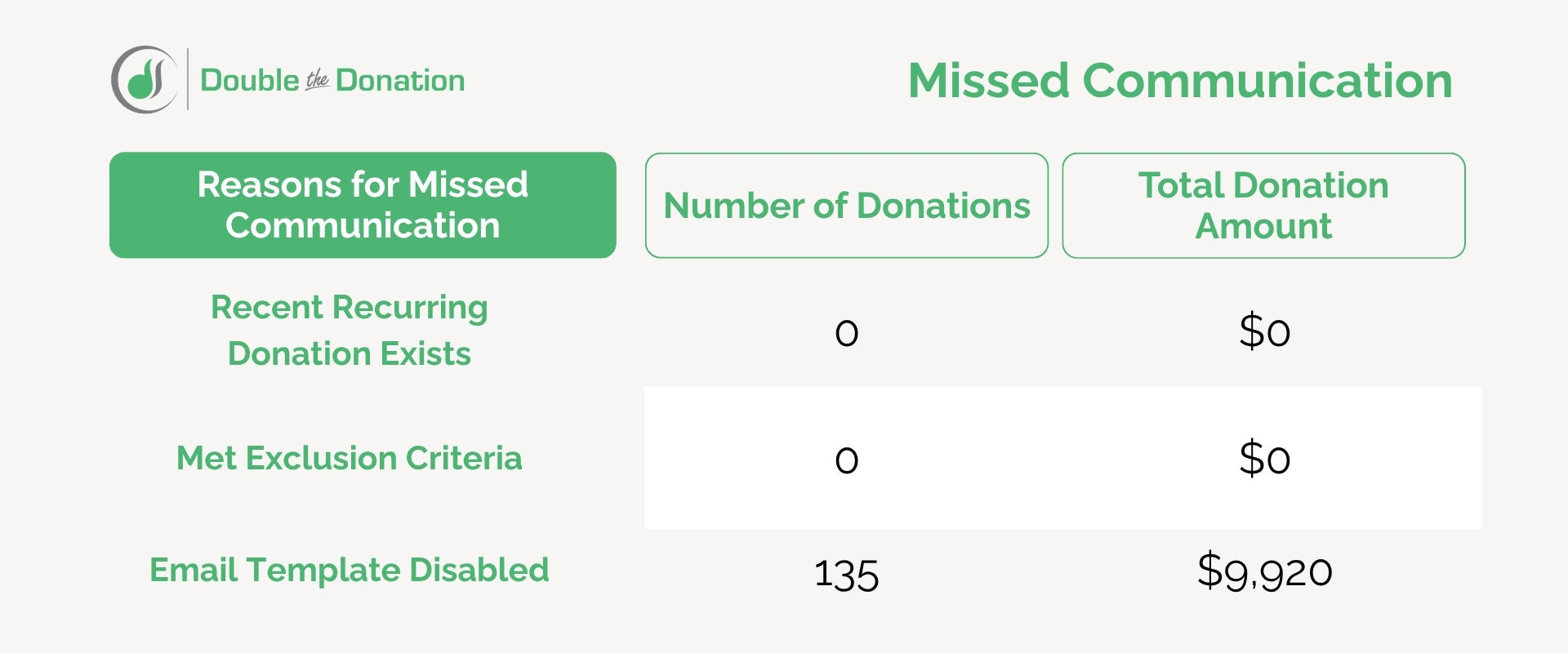
What it shows: Donors who did not receive an automated follow-up email due to missing email addresses, unsubscribe preferences, or custom exclusion rules.
Why it matters: Identifying these communication gaps allows you to reach out through secondary channels, such as direct mail or phone calls, ensuring no match-eligible donor is left behind.
5) Campaign Comparisons (scale winning strategies)
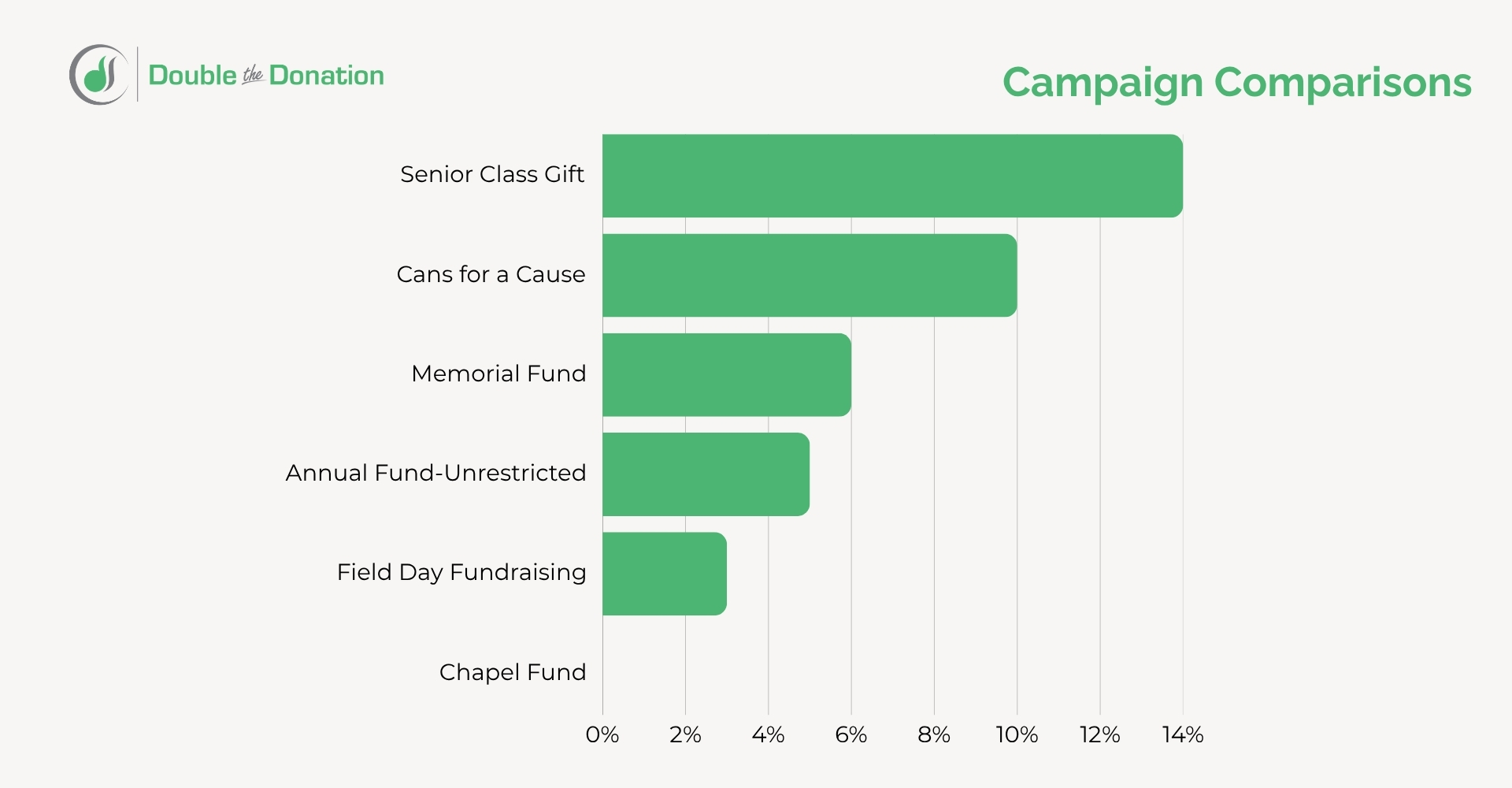
What it shows: A side-by-side performance review of workplace giving engagement across different fundraising campaigns, events, or donation forms.
Why it matters: Comparing campaign performance helps you see which messaging strategies, form placements, or events generate the highest number of corporate gift matches and volunteer grant requests.
6) Repeat Donors (build long-term loyalty)
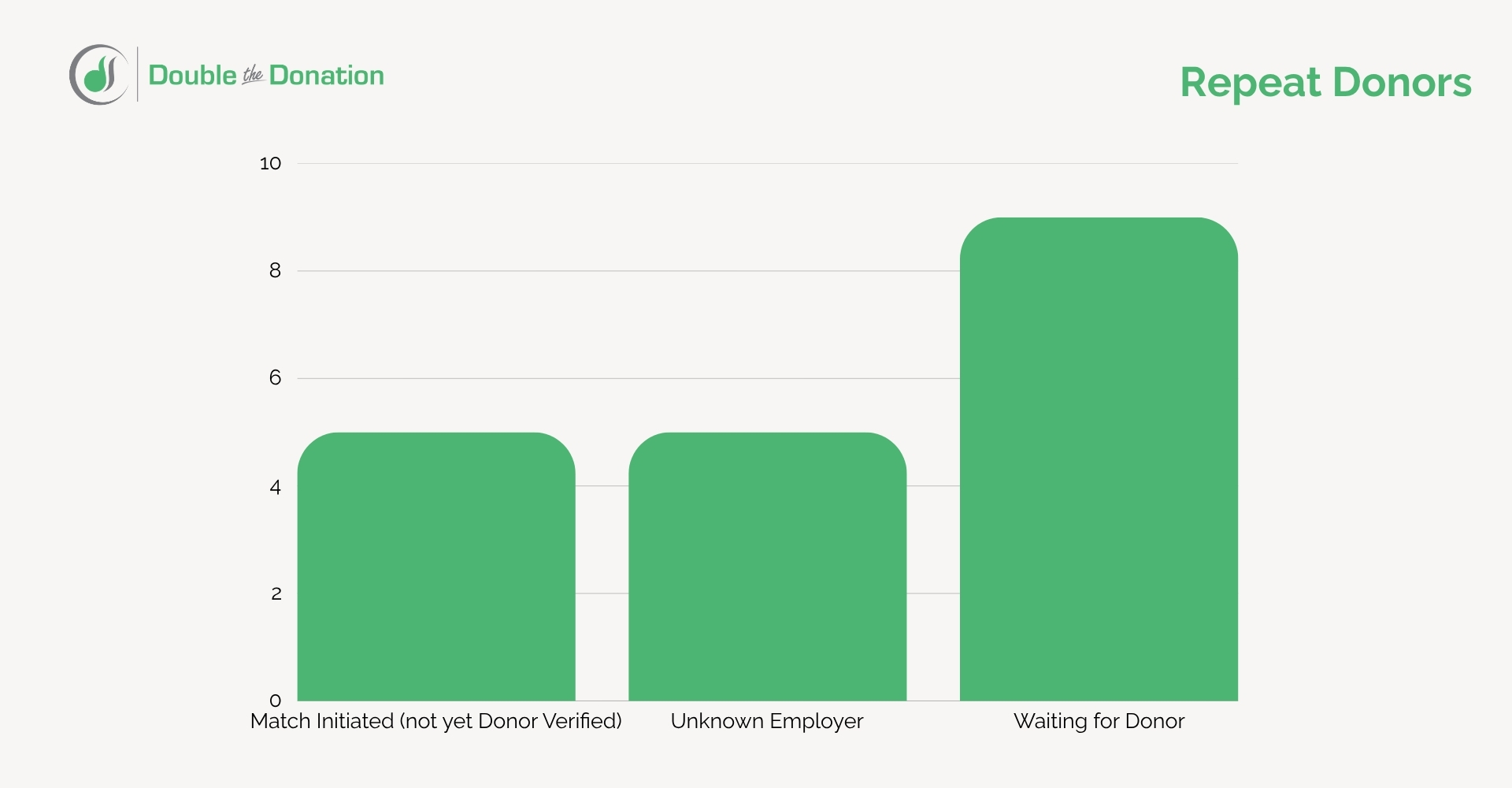
What it shows: Multi-time givers who regularly participate in workplace giving programs.
Why it matters: Repeat donors are ideal candidates for recurring giving initiatives, payroll deduction programs, or major gift cultivation.
7) Email Performance (refine automated outreach)
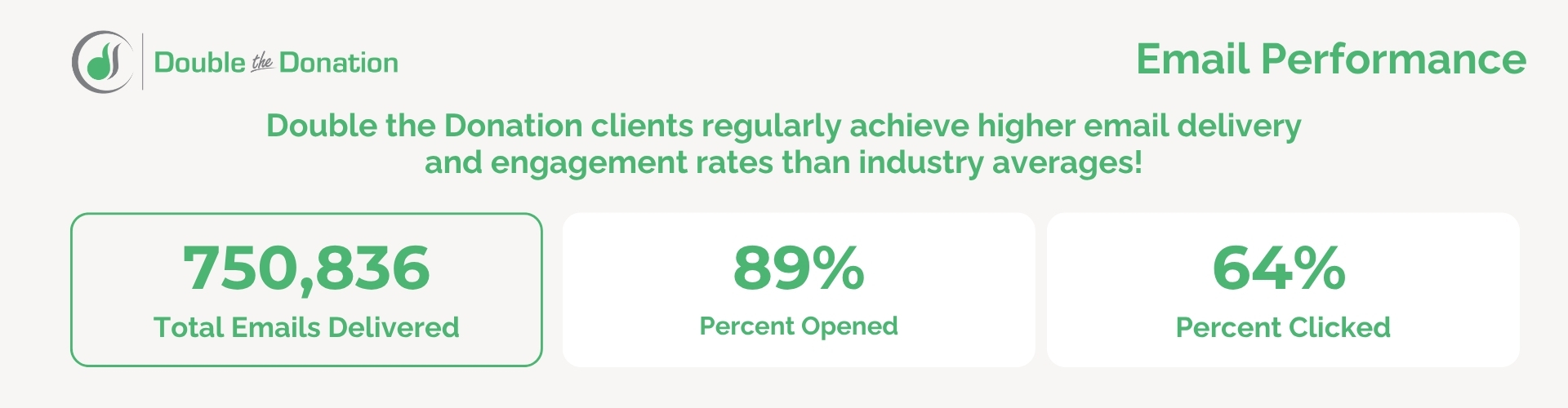
What it shows: Open rates, click-through rates, and match-submission conversions for your automated workplace giving email streams.
Why it matters: Tracking these metrics helps you test and refine email subject lines, timing, and calls-to-action to maximize donor conversion rates.
8) Match Identified Donations by Month (track seasonal patterns)
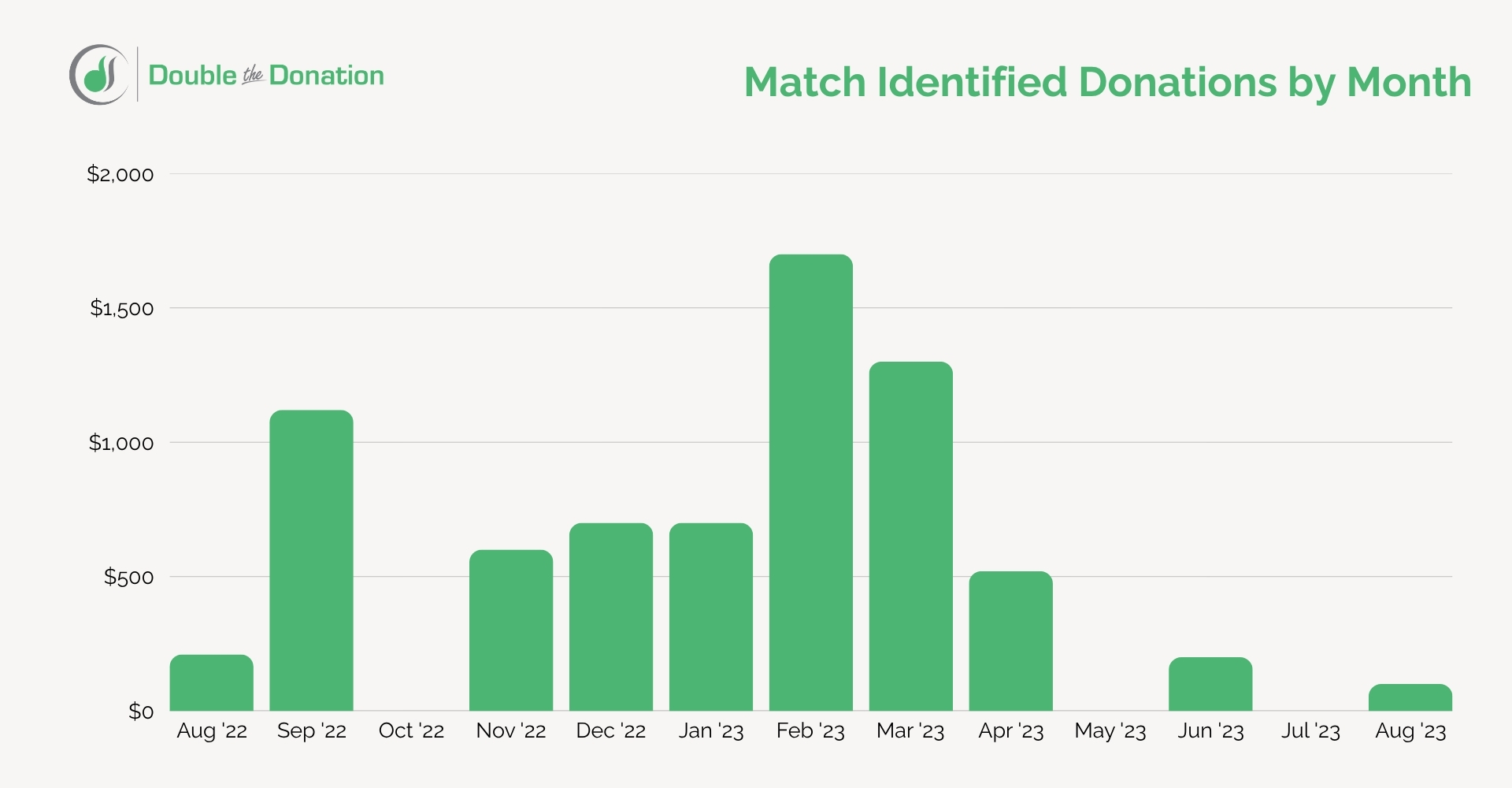
What it shows: Month-by-month trends in total match-identified revenue over time.
Why it matters: Seeing seasonal trends helps you plan campaign timing. For instance, tracking year-end spikes in Q4 allows you to prepare resources for peak matching gift submission deadlines in December and January.
9) Employer Identification Status (fill in data gaps)
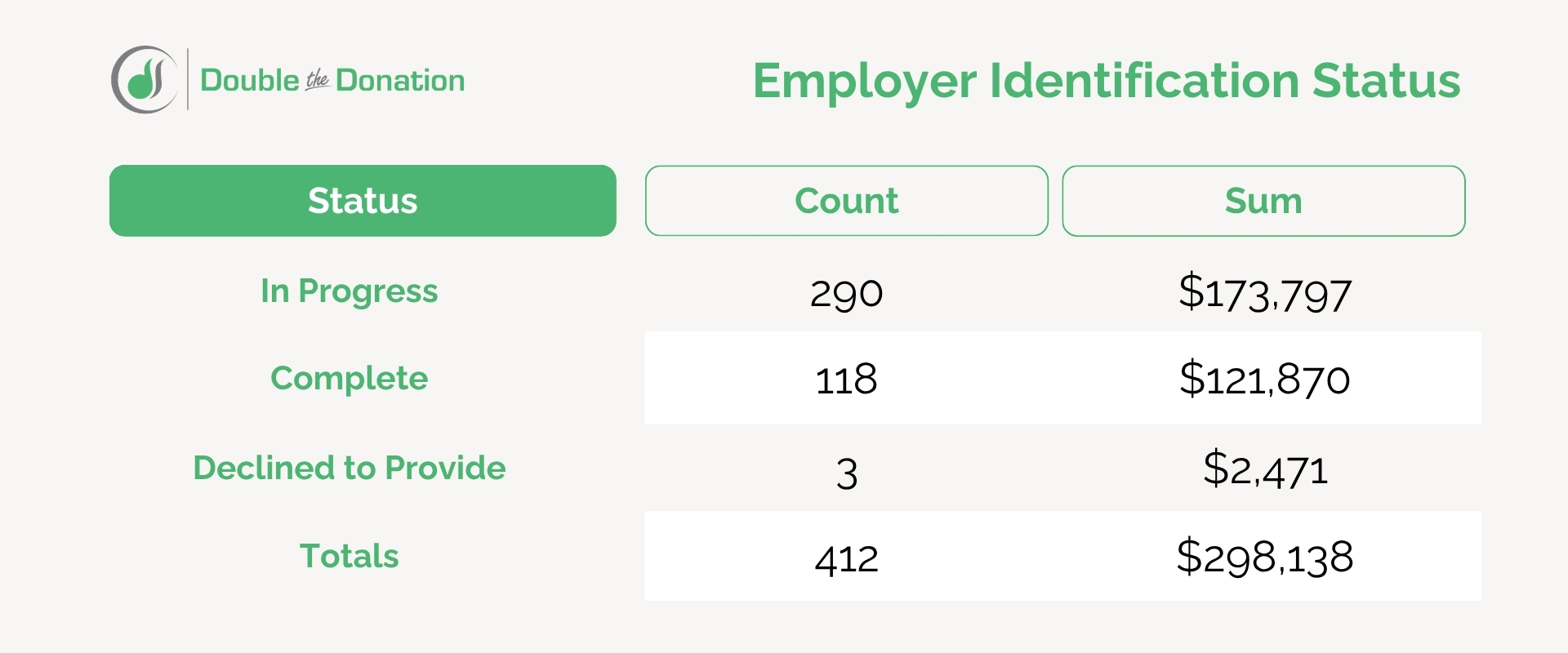
What it shows: A percentage breakdown of donor records with known employer data versus those listed as unknown.
Why it matters: This report highlights how well your donation forms and volunteer registration pages are capturing employment data. If your unknown rate is high, it may be time to add an employer search widget to your donation forms or confirmation pages.
10) Matching Gift Process Stage (simplify the donor journey)
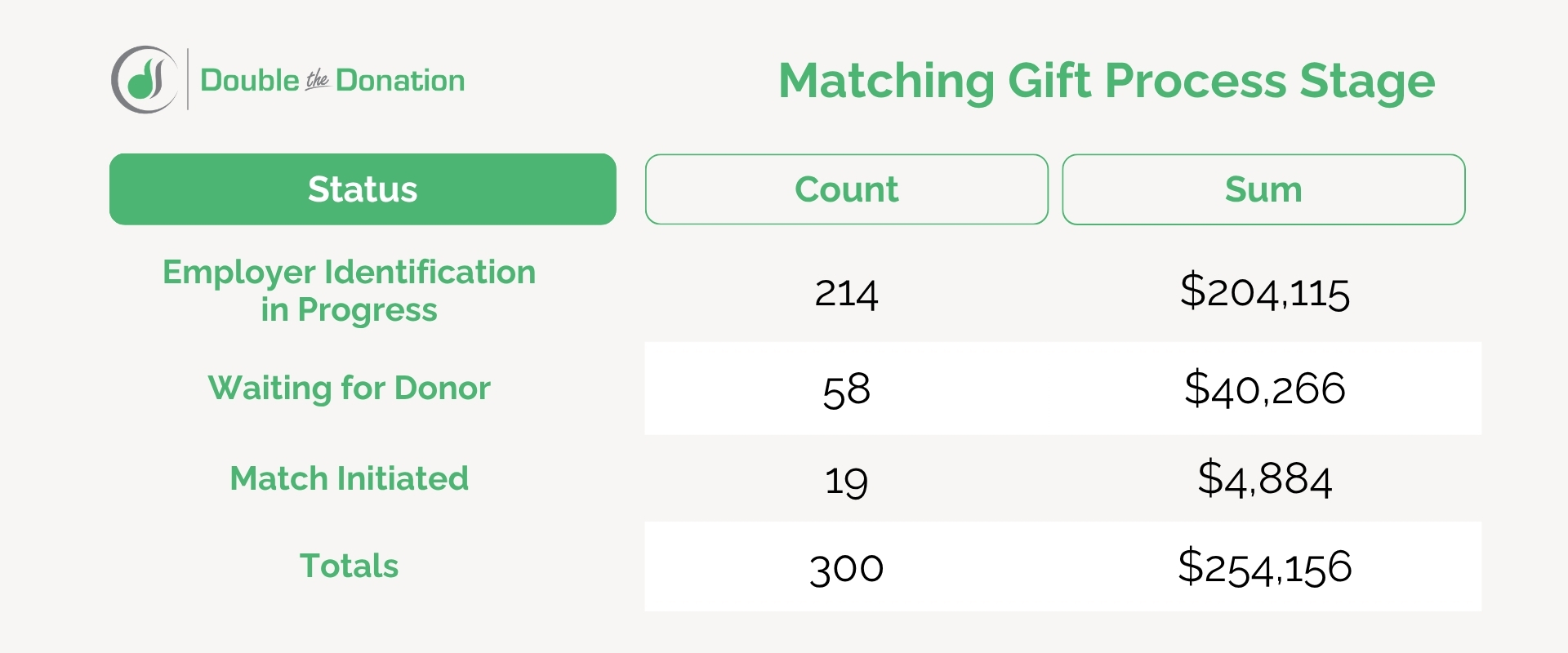
What it shows: Where donor matches sit in the submission lifecycle, from “Identified” to “Submitted,” “Verified,” and “Disbursed”.
Why it matters: Mapping out these stages helps you catch pipeline bottlenecks. You can see which matches require verification on your end so corporate payments arrive without delay.
Best Practices for Data-Informed Workplace Giving Success
Pulling reports is only the first step. To get the most out of your Double the Donation platform, use these practical strategies to transform your reporting data into higher revenue.
Send manual emails to follow up with eligible supporters.
While automated email streams handle the heavy lifting, high-value donor matches often benefit from a personal touch. Pull your “Eligible But Not Submitted” report monthly and send personalized messages to top-tier givers.
Convert well-represented employers into event sponsors.
Use your “Leading Companies” report to spot businesses with large numbers of employees giving to your cause. When planning galas, walkathons, or community events, reach out to corporate leads at these companies with tailored sponsorship pitches backed by supporter data.
Forecast incoming corporate funds.
Review your match process stages and monthly match identification reports to project expected corporate revenue for upcoming quarters. Accurate forecasting gives your board and finance teams a clearer picture of incoming cash flow.
Reverse-engineer standout campaigns.
Look at your top-performing campaigns in the “Campaign Comparisons” report. Identify why those efforts succeeded. Did they feature a prominent search plugin on the confirmation page? Did they use specific email messaging? Apply those winning tactics to lower-performing campaigns.
Audit your “ineligible” supporter records and outreach settings.
Schedule a quarterly review of your “Potentially Miscategorized Ineligible” and “Missed Communication” reports. Fixing donor email records, adjusting suppression rules, and updating employer matches ensures your system runs at peak performance.
Benchmark your org against peers and industry standards.
Compare your match-identification rates and email open rates against overall industry benchmarks. Striving for high engagement rates keeps your fundraising strategy on track for long-term growth.
Final Thoughts on Workplace Giving Reporting
Data reporting turns workplace giving from a passive funding stream into an active revenue engine. By regularly reviewing your Double the Donation workplace giving reports, your development team can identify hidden gift matches, build stronger relationships with top corporate employers, and close revenue gaps with ease.
Ready to unlock the full potential of your supporter data? Log in to your Double the Donation account today to explore your reporting dashboards, or schedule a demo with our team to see how automation can transform your fundraising!