4 Payroll Giving Web Pages to Inspire Your Own Nonprofit’s
In the nonprofit sector, the “sustainers” program, or monthly recurring donors, is often considered the Holy Grail of fundraising. These donors provide the predictable, unrestricted cash flow that allows organizations to keep the lights on and plan for the future. While most nonprofits focus on credit card subscriptions to build this base, there is a more stable, tax-efficient, and often overlooked avenue: payroll giving.
Payroll giving (often nested under “Workplace Giving“) allows employees to donate a portion of their paycheck to your nonprofit automatically. Because these donations are often deducted pre-tax and do not rely on credit card expiration dates, payroll donors have significantly higher retention rates than standard monthly givers.
However, there is a catch. Unlike a simple “Donate Now” button, payroll giving requires the donor to take action within their employer’s HR portal. If your website doesn’t explicitly guide them on how to do this, you will miss out on this revenue. This is why dedicated payroll giving web pages are essential. They serve as the educational bridge between a donor’s desire to give and the administrative steps required to make it happen.
In this guide, we’ll cover:
- The strategic necessity of a dedicated payroll giving hub
- Deep dives into 4 real-world examples of high-performing pages
- The essential anatomy of a conversion-optimized workplace giving page
- SEO and GEO strategies to ensure employees find your page
- How to cross-promote matching gifts to double the value of every payroll donor
Ready to turn your website into a recurring revenue engine? Let’s explore how to build the perfect payroll giving page.
The Strategic Value of Dedicated Payroll Giving Pages
Why should a nonprofit build a specific page for a donation method that happens off-site (i.e., in a corporate portal)? Because without it, you are invisible to the corporate donor.
Employees often search for terms like “How to donate to [Nonprofit Name] through work” or need specific information—like your Tax ID or Combined Federal Campaign (CFC) code—to fill out their employer’s forms. A dedicated page centralizes this data, reducing friction and capturing intent.
- Educational Value: Most donors do not know what “payroll giving” is. A dedicated page allows you to define the concept, explain the tax benefits (giving pre-tax lowers their taxable income), and highlight the convenience of “set it and forget it” philanthropy.
- Trust Signals: When a corporate employee logs into a platform like Benevity or YourCause, they see thousands of charities. Having a professional payroll giving web page signals that your organization is established, vetted, and “corporate-ready.” It validates the donor’s choice to allocate a portion of their hard-earned salary to your mission.
- The Revenue Impact: Payroll giving is not small change. More than $173 million is donated through payroll giving annually. Furthermore, payroll donors are prime candidates for retention; once a deduction is set up, it typically continues until the employee changes jobs or actively cancels it. By optimizing your web presence to capture these donors, you are investing in the highest Lifetime Value (LTV) segment of your supporter base.
4 Real-World Examples of Payroll Giving Web Pages
To understand what makes a payroll giving web page successful, let’s analyze five organizations that have mastered the art of digital stewardship for workplace giving. These examples highlight different strategies, from emotional storytelling to logistical clarity.
1. Children’s Miracle Network Hospitals
Link: https://childrensmiraclenetworkhospitals.org/payroll-giving/
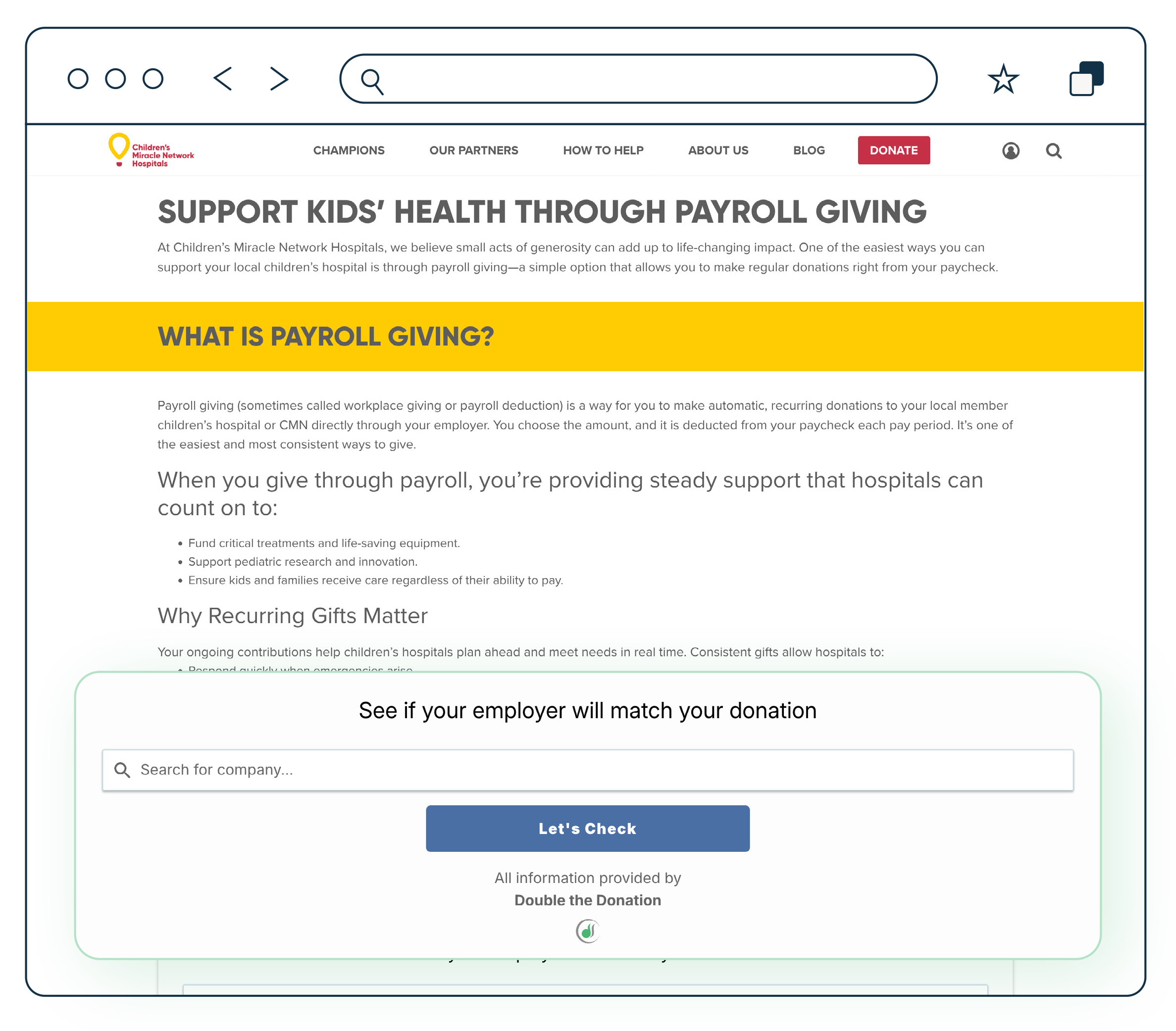
CMN Hospitals does an exceptional job of connecting the mechanism of giving (payroll deduction) to the emotional result (saving kids’ lives). Their page doesn’t just list instructions; it frames payroll giving as a partnership.
What they do right:
- Visual Storytelling: They use high-quality images of children who have benefited from the hospital network. This reminds the potential donor why they are setting up the deduction.
- Clear Value Proposition: The copy emphasizes that small contributions from each paycheck add up to “miracles.” This overcomes the objection that a $5 or $10 deduction isn’t “enough” to make a difference.
- Partner Highlights: They showcase corporate partners who already participate. This leverages social proof—if a donor sees their employer’s logo (e.g., Walmart or Costco), they feel confident that the pathway to giving is already established.
Takeaway: Don’t let the administrative nature of payroll giving dry out your messaging. Keep the mission front and center.
2. Pets for Patriots
Link: https://www.petsforpatriots.org/payroll-giving/
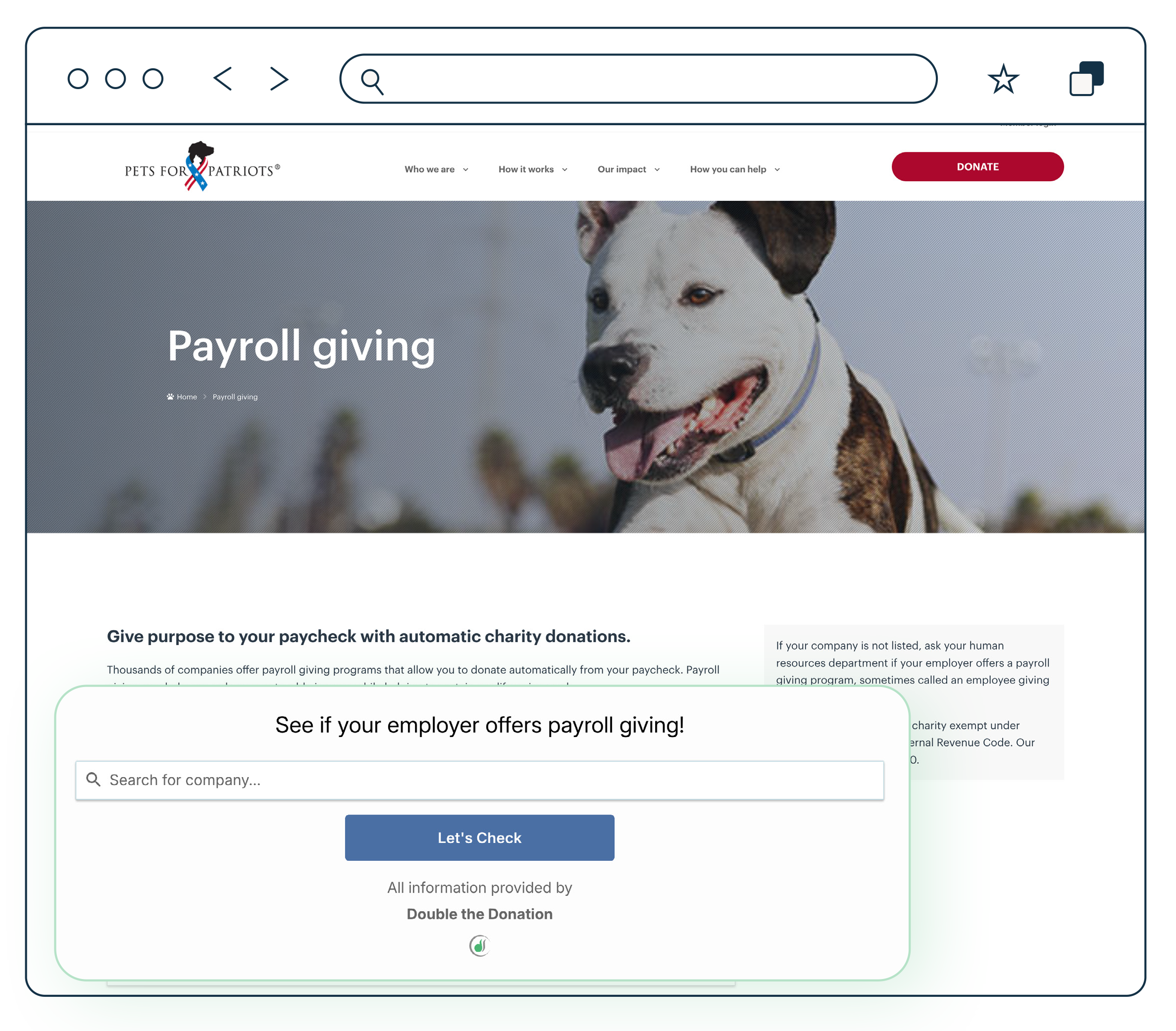
Pets for Patriots, which helps veterans adopt shelter animals, understands its audience perfectly. Because their mission aligns closely with military and government values, their page is heavily optimized for federal employees.
What they do right:
- CFC Code Prominence: The most critical element on this page is their Combined Federal Campaign (CFC) number. It is displayed large and bold. For federal employees and military personnel, this code is the only thing they need to set up a donation during the CFC pledging season.
- Platform Diversity: They don’t just stop at the CFC. They list state employee campaigns and private sector platforms (like Benevity), ensuring they capture donors from all sectors.
- Trust Indicators: They prominently display their “Seal of Transparency” and charity ratings. Since payroll donors often give blindly (without meeting staff), these third-party validations are crucial for conversion.
Takeaway: If your nonprofit qualifies for government giving campaigns (CFC or state equivalents), your code must be the hero of your payroll giving web page.
3. World Animal Protection
Link: https://www.worldanimalprotection.us/ways-to-give/payroll-giving/
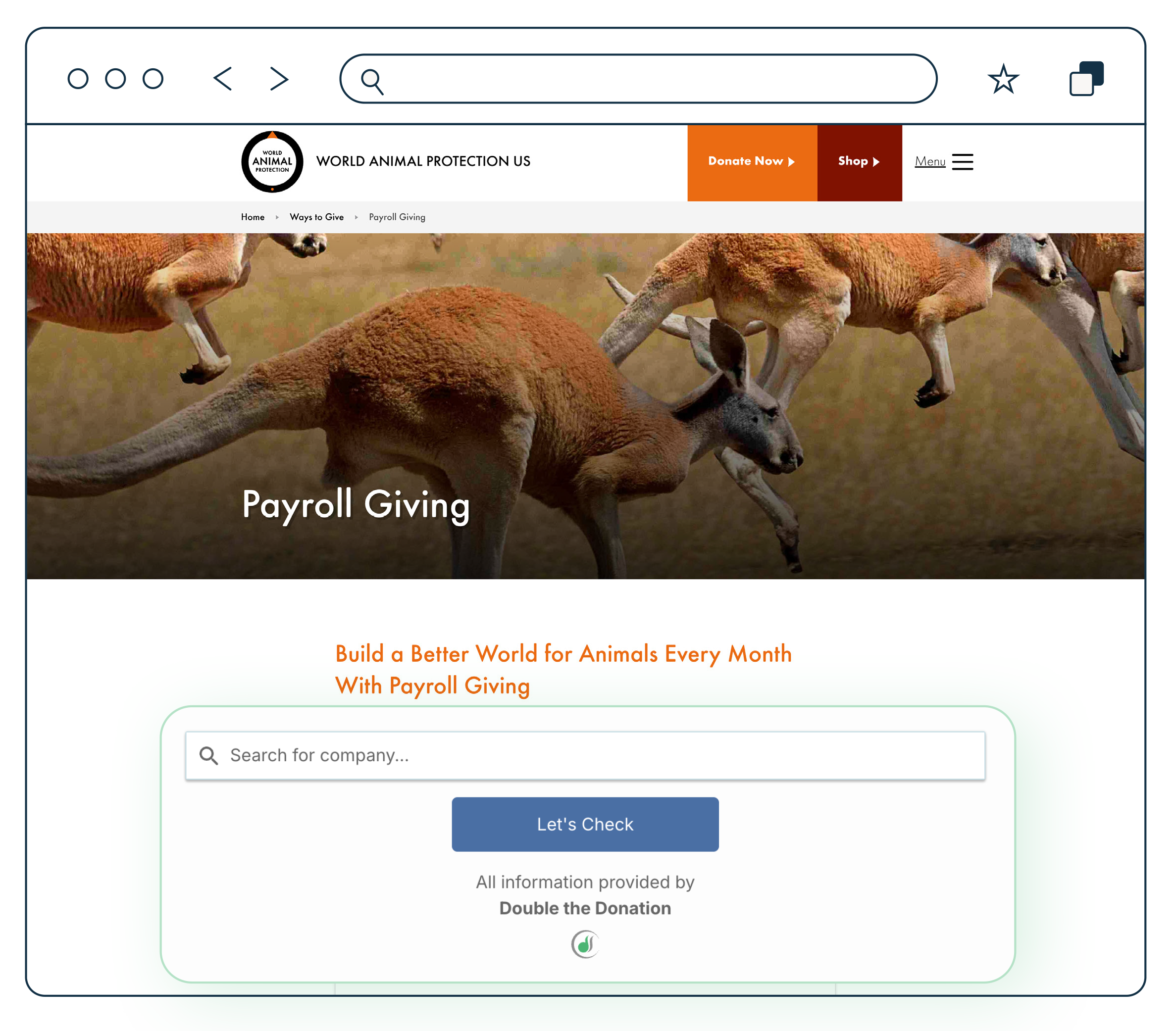
This organization takes a pragmatic approach, focusing heavily on the financial ease and benefits for the donor. They position payroll giving as a smart financial decision as much as a charitable one.
What they do right:
- Explaining Pre-Tax Giving: They clearly articulate that payroll giving is tax-effective. By explaining that donations come out before tax, they help the donor understand that a $20 donation might only “cost” them $15 in take-home pay.
- Simplicity: The layout is clean and text-focused, reducing distraction. They offer a simple downloadable form or instructions for HR, acknowledging that not all companies have digital portals.
- Direct Contact: They provide a dedicated email address for their “Supporter Care” team. This ensures that if a donor hits a roadblock with their HR department, they have a lifeline at the nonprofit to help troubleshoot.
Takeaway: Use your page to educate donors on the financial perks of workplace giving. “Give more for less” is a compelling hook.
4. GBS/CIDP Foundation International
Link: https://www.gbs-cidp.org/donate/other-ways-to-give/payroll-corporate-giving/
The GBS/CIDP Foundation treats payroll giving not as a silo, but as part of a broader “Corporate Giving” ecosystem. Their page aggregates several ways to give through work into one central location.
What they do right:
- Bundling with Matching Gifts: They explicitly mention matching gifts alongside payroll deductions. This is a critical strategy (the “double dip”), reminding donors that their recurring payroll gift might also be eligible for a corporate match.
- United Way Integration: They provide specific instructions for United Way write-in campaigns. Many companies use United Way as their giving administrator, so providing write-in details is essential for capturing funds from donors outside of your immediate geographic chapter.
- Employer Search: They integrate a search tool to help donors find their company’s specific program guidelines, bridging the gap between the donor and the corporate portal.
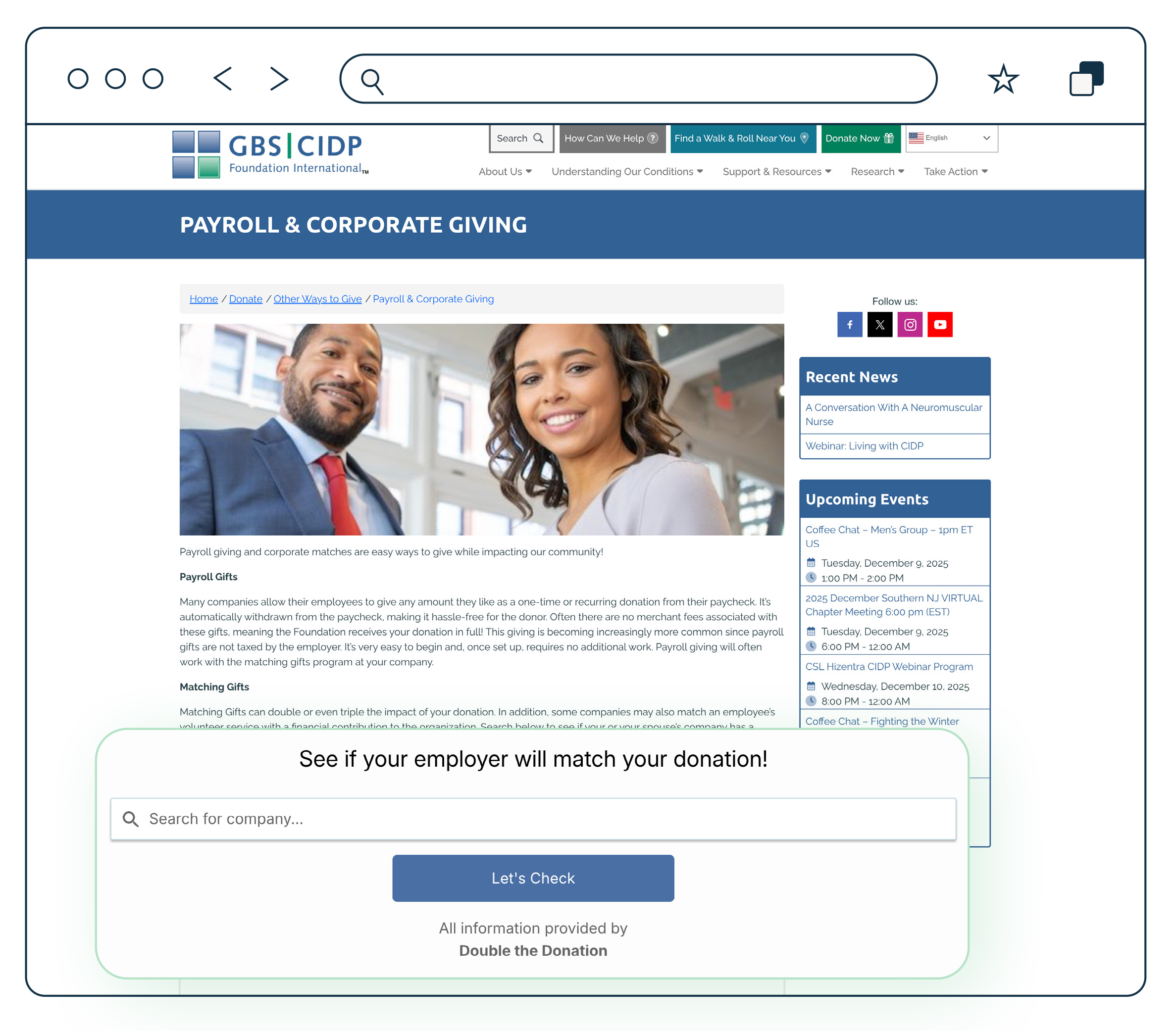
Takeaway: Make it as easy as possible for your supporters to learn about workplace giving. Provide all the information they might need to get started in one convenient location!
Essential Features of a High-Converting Page
Based on these examples, a high-performing payroll giving web page must include specific architectural elements to maximize conversions.
1. The “How-To” Block
Don’t assume the donor knows how to enroll. Provide a clear 3-step guide:
- Log in to your employee portal (e.g., Benevity, YourCause).
- Search for [Nonprofit Name] or use Tax ID [12-3456789].
- Select “Recurring Payroll Deduction.”
2. Vital Statistics Sidebar
Create a clearly visible box or sidebar containing the “copy-paste” data a donor needs to fill out a corporate form:
- Legal Name: (As listed on your IRS letter).
- DBA Name: (If you go by an acronym).
- EIN / Tax ID: (Crucial for search).
- Mailing Address: (Where the third-party processor sends the check).
- CFC/United Way Codes: (If applicable).
3. The Employer Search Tool
Embed a corporate giving database widget (like Double the Donation’s) directly on the page. This allows the donor to enter their employer’s name and immediately see whether their company offers payroll deductions or matching gifts. This interactivity keeps the donor on your page longer and provides instant answers.
4. The Matching Gift Cross-Sell
Never talk about payroll giving without talking about matching gifts. Include a section that says: “Did you know? Many companies will match your payroll contributions. Check with your HR department to double your impact!”
SEO and GEO Strategies for Payroll Giving
To ensure your payroll giving web pages rank highly in search engines (SEO) and appear in AI-generated answers (GEO – Generative Engine Optimization), you need to target the right intent.
- Keywords: Target long-tail keywords that employees type when they are sitting in their HR portal confused.
- “How to donate to [Nonprofit Name] through work”
- “[Nonprofit Name] federal tax ID for donations”
- “[Nonprofit Name] United Way code”
- “Benefits of payroll giving for [Cause]”
- Schema Markup: Use FAQ schema on your page to answer common questions like “Is my donation tax-deductible?” or “How do I cancel a payroll donation?” giving you a better chance of appearing in Google’s “People Also Ask” boxes.
- Generative Engine Optimization (GEO): AI search tools (like ChatGPT or Google’s AI Overview) prioritize direct answers. Ensure your page has a clear section titled “How to set up payroll giving for [Nonprofit Name]” with a numbered list. This structure is easily scrapable by AI, increasing the likelihood that a bot will cite your page as the source of truth.
Combining Payroll Giving with Matching Gifts
The true power of payroll giving web pages is unlocked when you layer matching gifts on top. Payroll giving provides the base revenue, and matching gifts provide the growth.
Many corporate giving portals (such as CyberGrants or Benevity) allow employees to request a match when setting up their payroll deduction. It is often a simple checkbox during the setup process.
Your Strategy: On your web page, explicitly instruct donors to look for this checkbox. Use language like: “When setting up your deduction in your company portal, look for the ‘Request a Match’ option. One click could double your donation automatically!”
By integrating these two streams, you create a “set it and forget it” revenue engine where a single donor action results in two checks arriving at your nonprofit every month: one from the employee and one from the corporation.
Wrapping Up & Next Steps
A dedicated payroll giving web page is not just an informational resource; it is a revenue capture device. By providing clear instructions, essential data (like your EIN), and emotional motivation, you lower the barrier to entry for your most valuable type of donor—the recurring sustainer.
Ready to build your page? Start here:
- Gather your codes: Find and communicate your EIN or tax ID number to make donor registration as simple as possible.
- Audit your partners: Look at your donor list to see which major employers (e.g., Walmart, Microsoft, etc.) are represented, and write specific instructions for those portals.
- Install a search tool: Use a solution like Double the Donation to let donors instantly check their eligibility.
Don’t let the friction of corporate portals slow down your fundraising. Build the page, guide the donor, and watch your recurring revenue grow. Get a personalized demo of Double the Donation’s payroll giving module to see our tools in action!